




- Overview
- Crawling vs. Indexing vs. Ranking
- The Five-Step Indexing Pipeline
- JavaScript Rendering and Mobile-First
- What Is Crawl Budget?
- How to Optimize Crawl Budget
- How Robots.txt Controls Crawling
- Common Robots.txt Mistakes
- XML Sitemaps: Your Direct Line to Google
- Common Indexing Issues and Fixes
- Tools for Checking Indexing Status
- Google's Rising Quality Bar (2025–2026)
- FAQ
- References
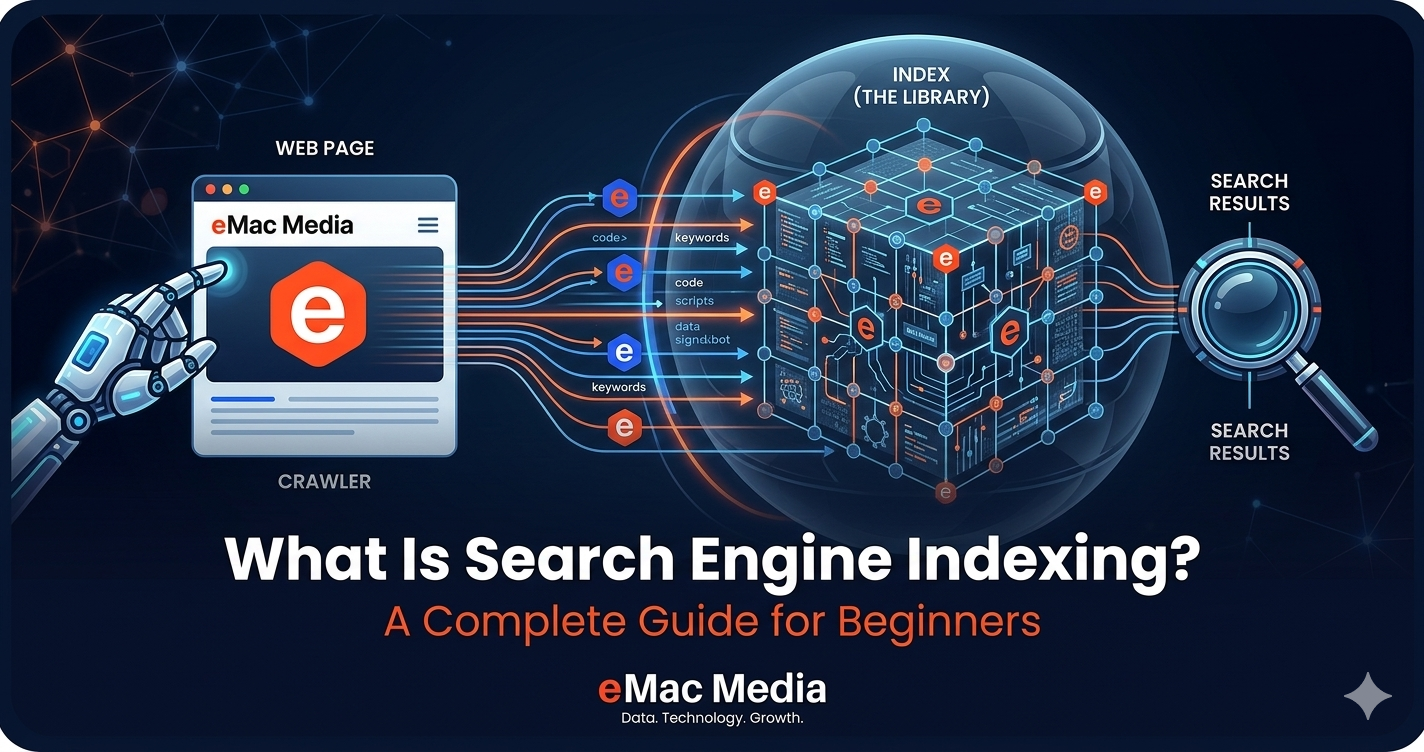
Search engine indexing is how Google organizes and stores web page information so it can return results in milliseconds. Without indexing, your page doesn't exist in search. This guide explains the full crawl-to-index pipeline, breaks down crawl budget, robots.txt, and XML sitemaps, and covers the most common indexing problems we see across client sites. We also look at the recent wave of de-indexing events that have made earning a spot in Google's index harder than ever.
Crawling vs. Indexing vs. Ranking: Three Stages, Not One
People use "indexing" to mean everything from Google finding a page to ranking it. In reality, Google Search works in three separate stages, and mixing them up leads to misdiagnosis when things go wrong.
Crawling is discovery. Googlebot (specifically Googlebot Smartphone, which became the universal default in July 2024) visits a URL, downloads its HTML, images, and other resources. Think of it as Google knocking on your door and taking a photo of what's inside.
Indexing is analysis and storage. Google processes the downloaded content: it reads the text, evaluates quality, checks for duplicate content, extracts structured data, catalogs internal and external links, and decides whether the page is worth storing. The technical SEO health of your site plays a direct role in how efficiently this happens.
Ranking is retrieval. When someone types a query, Google searches its index (not the live web) and returns results ordered by relevance and quality. A page that isn't indexed simply cannot rank, no matter how good the content is.
Google's index holds over 100 petabytes of data across an estimated 400 billion documents. At its core is an inverted index: a data structure that maps every word to a list of documents containing it. Instead of reading billions of pages every time someone searches, Google looks up the word and pulls matching document IDs in milliseconds.
A page can be crawled without being indexed, and indexed without ranking well. When traffic drops, the first question to ask is which stage broke: was Google unable to crawl the page, did it crawl but refuse to index, or is the page indexed but ranking poorly?
The Five-Step Indexing Pipeline
Google's documentation describes a linear process, but in practice there's a lot of queuing, prioritization, and re-evaluation happening behind the scenes. Here's what the pipeline actually looks like:
Pages get discovered in three main ways: links from already-known pages, XML sitemaps submitted through Google Search Console, and direct URL submissions. Google has said plainly that there is no central registry of all web pages, so it must constantly look for new and updated ones.
Not every discovered URL gets crawled immediately. Google maintains a crawl queue and prioritizes URLs based on factors like the site's authority, how often the page changes, and how many other pages link to it. Some pages sit in the queue for weeks before Googlebot visits them.
JavaScript Rendering and Mobile-First Indexing
A major change in recent years: Google now renders every page before indexing it. Martin Splitt from Google confirmed in 2024 that there is no indexing before rendering has completed, which eliminates the old "two waves of indexing" concept that SEOs worried about for years.
Google's Web Rendering Service runs the latest stable version of Chrome. Vercel's analysis of over 100,000 Googlebot fetches found that 100% of HTML pages resulted in full-page renders, including pages with complex JavaScript interactions. Rendering typically completes in under 5 seconds.
That said, server-side rendering still matters. Third-party AI crawlers like GPTBot and ClaudeBot often cannot process JavaScript, which is increasingly relevant for AI search visibility. If your site architecture relies heavily on client-side rendering, you could be invisible to answer engines even if Google indexes you fine.
Mobile-first indexing reached full completion on July 5, 2024. Every website is now crawled exclusively by Googlebot Smartphone. If the mobile version of a site is missing content or structured differently from the desktop version, search visibility suffers across all devices.
What Is Crawl Budget?
Crawl budget is the number of URLs Google can and wants to crawl on your site within a given timeframe. It breaks into two parts: the crawl capacity limit (how fast Googlebot can fetch without overloading your server) and crawl demand (how much Google actually wants to crawl based on your site's popularity and freshness).
Here's the thing most site owners get wrong: crawl budget only matters at scale. Google's own documentation says it's primarily a concern for sites with 1 million or more unique pages that change moderately often, or sites with at least 10,000 pages that update daily. Gary Illyes from Google has estimated that 90% of sites don't need to worry about it at all.
If new pages on your site tend to be crawled the same day they're published, crawl budget isn't your problem. But if you're running a large ecommerce catalog, a site with heavy URL parameter generation, or a publisher with years of archived content, it's worth paying attention to.
Crawl budget is real, but it's over-discussed for most websites. If you have under 10,000 pages and your content gets indexed within a few days, your time is better spent on content quality than crawl optimization.
How to Optimize Crawl Budget
For larger sites where crawl budget does matter, the optimization strategies are straightforward. Start by managing your URL inventory with robots.txt to block low-value pages like internal search results, filter pages, and session-based URLs. Consolidate duplicate content with proper canonical tags. Return 404 or 410 status codes for removed pages instead of soft 404s. Eliminate redirect chains, since they have a documented negative effect on crawl efficiency.
Keep your sitemaps current with accurate lastmod dates. Google ignores lastmod values that don't match actual page changes, so don't set them to today's date across the board. Improving server response times helps too. Studies suggest that reducing response time by just 100ms can increase crawling volume by 15%.
Google clarified in a December 2024 documentation update that using noindex is not an efficient way to control crawl budget because Google still has to crawl the page to find the directive. Pages returning 4xx status codes (except 429) don't waste crawl budget either. Google gets the status code and moves on.
Are indexing issues costing you traffic?
Our technical SEO audits uncover crawl budget waste, indexing blockers, and rendering problems that keep your pages out of Google's index.
How Robots.txt Controls Crawling
Robots.txt is a plain text file at your website's root directory (yoursite.com/robots.txt) that tells crawlers which areas they can access. It follows the Robots Exclusion Protocol, which became internet standard RFC 9309 in 2022. Google open-sourced its own production robots.txt parser (the one it has used for 20+ years) in 2019.
The file uses four main directives. User-agent specifies which crawler the rules apply to (the asterisk means all bots). Disallow blocks crawling of specified paths. Allow permits access to specific paths within a broader Disallow. And Sitemap references your XML sitemap location.
Google ignores the crawl-delay directive entirely. It also ignores changefreq and priority values in sitemaps.
The single most important thing to understand about robots.txt: it controls crawling, not indexing. If another website links to a page you've blocked with robots.txt, Google can still index that URL. It will just show up in results as a bare URL without a title or snippet. To actually prevent indexing, you need the noindex meta tag or X-Robots-Tag HTTP header, and the page must remain crawlable so Google can read the directive.
Common Robots.txt Mistakes
We see several recurring mistakes in technical SEO audits. The most damaging is accidentally blocking CSS and JavaScript files, which prevents Google from rendering pages correctly and can tank indexing across the entire site.
Overly broad Disallow rules are another common problem. A rule like Disallow: /blog when you meant to block /blog/drafts will block your entire blog from being crawled.
The worst mistake is combining robots.txt blocking with noindex tags. This creates a paradox: Google can't see the noindex directive if it can't crawl the page, so the page stays in the index as a bare URL, which is usually the opposite of what you wanted.
With AI crawlers becoming more prevalent (Cloudflare's 2025 data shows 14% of top domains now use robots.txt rules to manage AI bots), Google published a "Robots Refresher" series in March 2025 covering the protocol's future. Managing AI crawler access through robots.txt is now a real operational consideration for most sites.
XML Sitemaps: Your Direct Line to Google
An XML sitemap is a structured file listing URLs you want search engines to know about. Think of it as a table of contents for your website, delivered directly to Googlebot. Google's documentation (updated December 2025) emphasizes that sitemaps are hints, not commands. Submitting a URL doesn't guarantee crawling or indexing.
Each URL entry supports three tags: loc (the full URL, required), lastmod (last modification date, optional but useful when accurate), and two tags Google ignores completely: changefreq and priority. Google has learned to identify sites that lie about modification dates, and it ignores inaccurate lastmod values.
For large sites, sitemap index files let you reference multiple individual sitemaps. Each sitemap file supports up to 50,000 URLs or 50MB uncompressed. You can submit up to 500 sitemap index files per site through Search Console.
Sitemaps matter most for new sites with few external links, large sites where crawlers can't discover every page through internal linking, and sites with rapidly changing content. A HubSpot study found that without sitemap submission, average crawl time for new pages was about 23 hours, but with Search Console submission, this dropped to roughly 14 minutes.
For small sites (under 100 pages) with strong internal link structures, sitemaps are helpful but less critical. Google can usually find everything through links alone.
Common Indexing Issues and How to Fix Them
Google Search Console groups indexing problems under two status messages, and understanding the difference between them will save you a lot of wasted effort.
"Discovered, currently not indexed" means Google found the URL but hasn't crawled it yet. The page is sitting in a queue, deprioritized because of crawl budget constraints, slow server responses, weak internal linking, or Google's low quality perception of the overall site. The fix is usually about increasing the page's priority: improve internal linking from high-authority pages, make sure the URL is in your sitemap, and improve server speed.
"Crawled, currently not indexed" is the more concerning status. Google visited the page, read the content, and deliberately decided not to index it. This is a quality or relevance judgment, not a technical barrier. Gary Illyes stated at SERP Conf in February 2024 that if the number of these URLs is very high, it hints at general quality issues across the site.
Other common blockers include incorrect canonical tags (causing Google to index the wrong version or no version at all), orphan pages with zero internal links, thin content that adds nothing new beyond what already exists in the index, persistent server errors (5xx) that signal unreliability, and conflicting signals from pages blocked by robots.txt but listed in sitemaps.
| Issue | What's Happening | How to Fix |
|---|---|---|
| Discovered, not indexed | Google found the URL but hasn't crawled it yet | Strengthen internal links, add to sitemap, improve server speed |
| Crawled, not indexed | Google crawled the page and chose not to index it | Improve content quality and uniqueness, consolidate thin pages |
| Duplicate without canonical | Multiple versions exist with no canonical signal | Add rel="canonical" pointing to the preferred version |
| Noindex tag detected | Page has a noindex directive |
Remove the tag if indexing is desired |
| Blocked by robots.txt | Crawling is prevented by robots.txt rules | Update robots.txt to allow crawling; use noindex if you want to prevent indexing instead |
| Soft 404 | Page returns HTTP 200 but shows error content | Return a proper 404 or 410 status code, or add real content |
The fix pattern for most indexing issues follows the same logic: improve content quality and uniqueness first, then strengthen internal linking from your best-performing pages, set proper canonical tags, update your sitemap, and use the URL Inspection tool to request re-indexing. But only do that last step once per URL, and only after you've actually fixed the underlying problem.
Not sure what's blocking your pages from ranking?
Our free consultation includes an indexing health check to identify exactly where your site is losing visibility.
Tools for Checking Indexing Status
Google Search Console is the primary tool. The URL Inspection tool shows whether a specific URL is indexed, when it was last crawled, which version of Googlebot was used, whether indexing is allowed, and whether Google's selected canonical matches the one you declared. It also offers a live test that renders the page in real time, showing a screenshot, rendered HTML, JavaScript console messages, and loaded resources.
The Page Indexing report (formerly called the Coverage report) gives you a site-wide view, categorizing all known URLs with specific reasons for why they are or aren't indexed. After fixing issues, the "Validate fix" button triggers Google to re-check affected URLs, and that typically completes within two weeks.
The site: search operator (for example, site:yoursite.com) provides a quick, informal check of indexed pages. It's not a precise count, but it's a useful first step for small business sites before diving into the full Page Indexing report.
Bing Webmaster Tools lets you submit up to 10,000 URLs per day (far more than Google Search Console) and supports the IndexNow protocol for instant content change notifications. IndexNow is now used by over 80 million websites, with 5 billion URLs submitted daily. However, Google still does not support IndexNow as of April 2026.
For deeper technical audits, Screaming Frog SEO Spider (free up to 500 URLs) is the industry standard desktop crawler. It identifies broken links, redirect chains, orphan pages, canonical issues, and soft 404s across an entire site. Cloud-based alternatives like Ahrefs Site Audit and Semrush Site Audit offer 100-130+ automated checks with integrations for reporting workflows.
Google's Rising Quality Bar (2025–2026)
The most important shift in SEO over the last two years isn't about keywords or links. It's about indexing thresholds. Google is actively choosing to index fewer pages, and the bar for what qualifies keeps going up.
In May 2025, 25% of 2 million monitored pages were actively removed from Google's index, breaking the typical 130-day indexing retention pattern. The June 2025 core update produced what analysts called the largest single-update index contraction in Google's history, with an estimated 15-20% reduction. The December 2025 core update targeted outdated content specifically, with 39% de-indexing rates for pages that hadn't been recently updated.
AI-generated content has been hit the hardest. Google issued manual actions for "scaled content abuse" against sites mass-producing AI content without genuine human expertise. John Mueller said in December 2025 that just rewriting AI content with a human touch won't change Google's perception of the site. The issue isn't individual pages; it's the site's overall value proposition.
Gary Illyes revealed in April 2024 that his mission was to figure out how to crawl even less, making scheduling more intelligent and focusing on URLs that are more likely to deserve crawling. He clarified that it's not crawling that consumes the most resources; it's indexing and potentially serving results. Google is getting selective about what earns index space because storage and serving aren't free.
Mueller also noted in November 2025 that consistency is the biggest technical SEO factor. Sites that maintain reliably high quality content get crawled and indexed more efficiently than sites with volatile output. For agencies managing multiple client sites, this reinforces that consistent content programs aren't just good for traffic; they're good for indexing health.
E-E-A-T (Experience, Expertise, Authoritativeness, Trust) used to be a ranking factor. In 2025-2026, it has become an indexing prerequisite. Content that doesn't demonstrate genuine expertise and originality may not earn a spot in Google's index at all, regardless of technical SEO.
Frequently Asked Questions
References & Sources
- 1.How Google Search Works — Google Search Central
- 2.Crawl Budget Management — Google Search Central
- 3.Build and Submit a Sitemap — Google Search Central
- 4.Myths and Facts About Crawling — Google Search Central
- 5.Crawling December: The How and Why of Googlebot Crawling — Google Search Central Blog
- 6.Robots Refresher: Future-proof Robots Exclusion Protocol — Google Search Central Blog
- 7.How Do Search Engines Work? — Ahrefs Blog
- 8.96.55% of Content Gets No Traffic From Google — Ahrefs Blog
- 9.Google Indexing Study: Insights from 16 Million Pages — IndexCheckr
- 10.From Googlebot to GPTBot: Who's Crawling Your Site in 2025 — Cloudflare Blog
- 11.JavaScript SEO: How Google Crawls, Renders and Indexes JS — Vercel Blog
- 12.Gary Illyes From Google Wants Googlebot to Crawl Less — Search Engine Roundtable
- 13.How Rendering Affects SEO: Takeaways From Google's Martin Splitt — Search Engine Journal
- 14.Page Indexing Report — Google Search Console Help
- 15.What is Search Engine Indexing and How Does it Work? — SE Ranking
- 16.The May 2025 Google Indexing Purge — Indexing Insight (Substack)


Stop Guessing. Start Getting Indexed.
Our technical SEO team diagnoses indexing issues, fixes crawl blockers, and builds the kind of content that earns a permanent spot in Google's index.
Get Your Free Strategy Proposal